Most budgeting apps hand you a pie chart and leave the actual question unanswered. My Daily Dollar answers it with one number: what you have left to spend this month, and whether you're ahead or behind.
Set it up once, in about five minutes. After that it's one number and a few seconds a day.
Your income and how often you're paid. One job or several.
Rent, car, phone, the lot — plus whatever you want to put away each month.
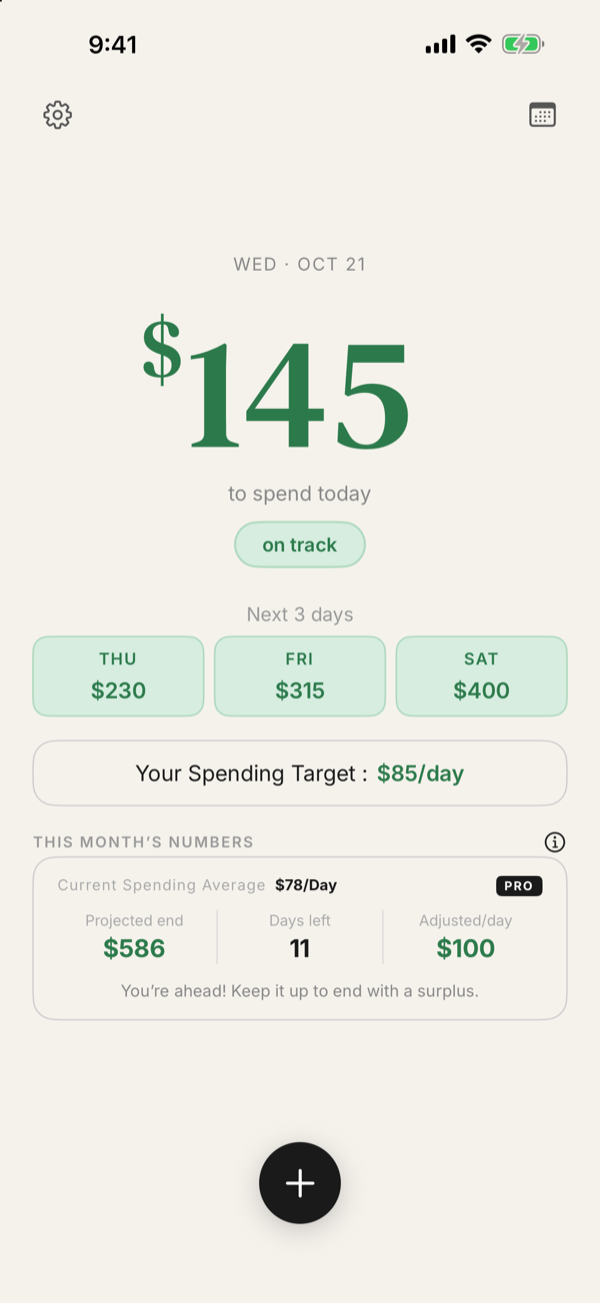
What you've been allowed so far this month, minus what you've spent. It grows every day you stay under.
Every day you're allowed your spending target, and every expense comes off. Spend under it and the number grows. Spend over and it shrinks, and if it drops below zero it turns red until you catch up. It's not about where every dollar went. It's about how much you're spending, and how fast. No categories to maintain, no envelopes to rebalance, nothing to reconcile at the weekend.
Amount, where, done. Nothing else is required, and there's no form to fight with.
The calendar fills in as you go, so you can watch a rough week climb back to green.
Home screen and lock screen widgets, so you can check without opening anything.
One optional reminder in the evening if you haven't logged. No streak to break.
Share one login and both phones see the same budget. Your partner logs a coffee, and it lands on your phone. No invites, no permissions, no separate family plan to buy — and one subscription covers you both.
When a month closes you get what's actually left, and a list of your savings, goals and debts to put it into. Type an amount next to each and watch the remainder count down to zero. Went over instead? The same screen helps you work out where it comes from.

Joseph Ingram, creator of My Daily Dollar
I'm Joseph. My wife and I both work in healthcare: I'm a radiology tech, and she's a registered nurse. We have two beautiful daughters, both in daycare (any parent knows what that does to a budget), and a sweet dog. We want to give our girls the world, which means being smart with our money.
We tried category budgets: so much for groceries, so much for gas, so much for going out. Groceries ran out in week three, and we still had to eat.
So I asked a simpler question: not where our money goes, but how much we're spending, and how fast. It started as a number on our fridge, then a spreadsheet, and now it's this app. We still use it every day.
I build and run it myself, so if something's wrong or missing, or you just want to say hi, write to me directly at jingram@dailydollar-app.com.
Your running total stays free. Always.
No ads, no time limit.
Or $4.99/month. New accounts get Pro free for 2 months, no card.
It never connects to your bank. Everything in it is what you typed in yourself, which is also why it can't get your balance wrong.
There are no ads and nothing tracking you across other apps. We don't sell your data, and there's a privacy policy that says so in plain language rather than in paragraphs of legal boilerplate.
And there's no guilt. No streak to break, no red banner for buying lunch. Some days you go over. You adjust, and watch the number climb back.